
Mobile Barcode Scanner for Inventory Management

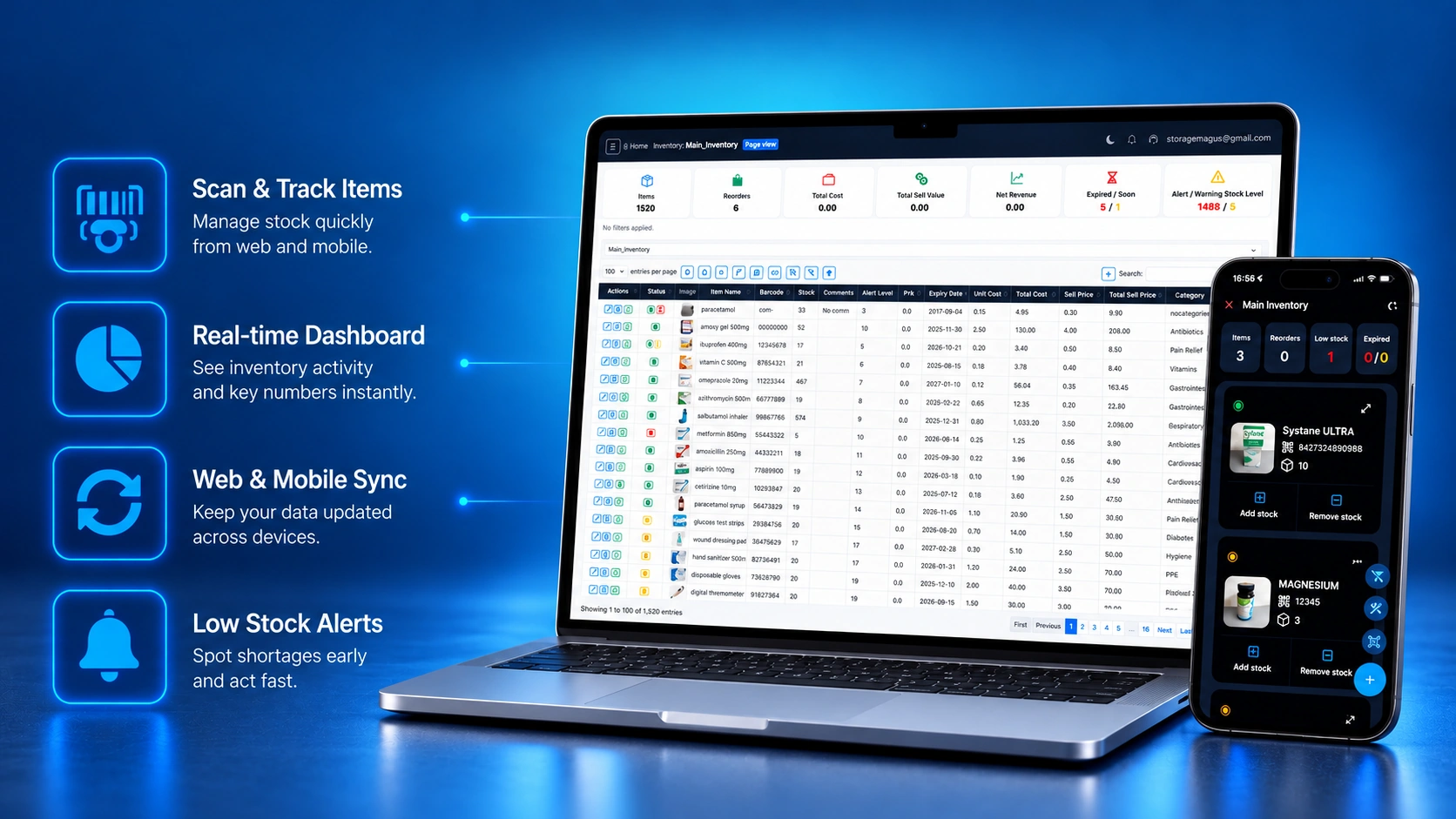
Turn a supported Android phone into a mobile inventory scanner for warehouse shelves, deliveries, stock counts, and everyday item updates. Scan barcodes, QR codes, item names, and expiry dates, then add products or update stock without buying dedicated scanner hardware.

Storagemagus is publicly available on Android and the web. The iPhone and iPad version is currently available through Apple TestFlight beta and has not yet been publicly released on the App Store.

Scan Barcodes, QR Codes, Item Names and Expiry Dates

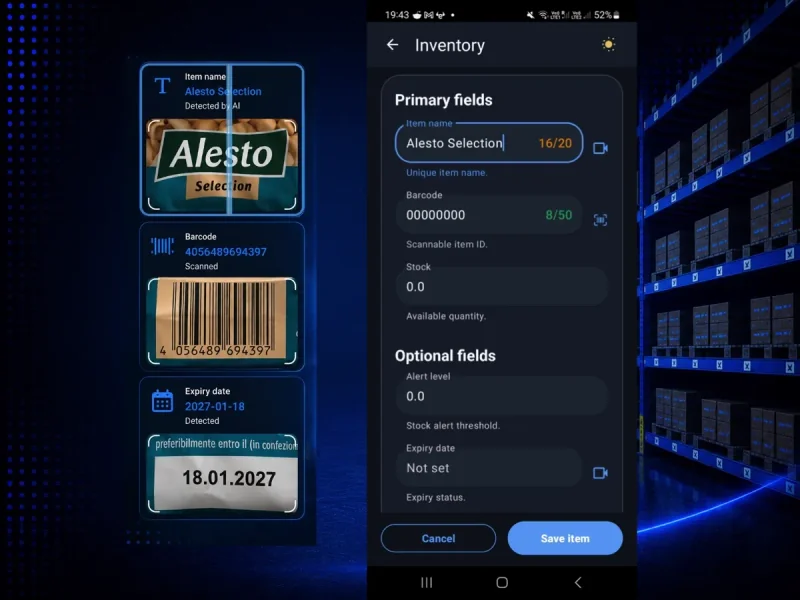
Turn your smartphone into a practical mobile inventory scanner with Storagemagus. Using a supported mobile device's camera, you can instantly scan barcodes, QR codes, item names, and expiry dates directly from product packaging. After identifying an item, add it to inventory, adjust its quantity, or review the current stock record without entering every detail manually.

This scanning workflow supports traditional product barcodes, QR labels, and packaging where the item name or expiry date is the information you need to capture. Whether you are receiving warehouse deliveries, counting retail stock, or checking supplies in a workshop, laboratory, or restaurant, Storagemagus helps connect the physical item to its inventory record using the device already in your hand. For a broader overview, explore the mobile inventory management features that connect scanning, item updates, and stock visibility in one system.
Storagemagus offline inventory mode on Android

Keep Scanning and Updating Stock Offline

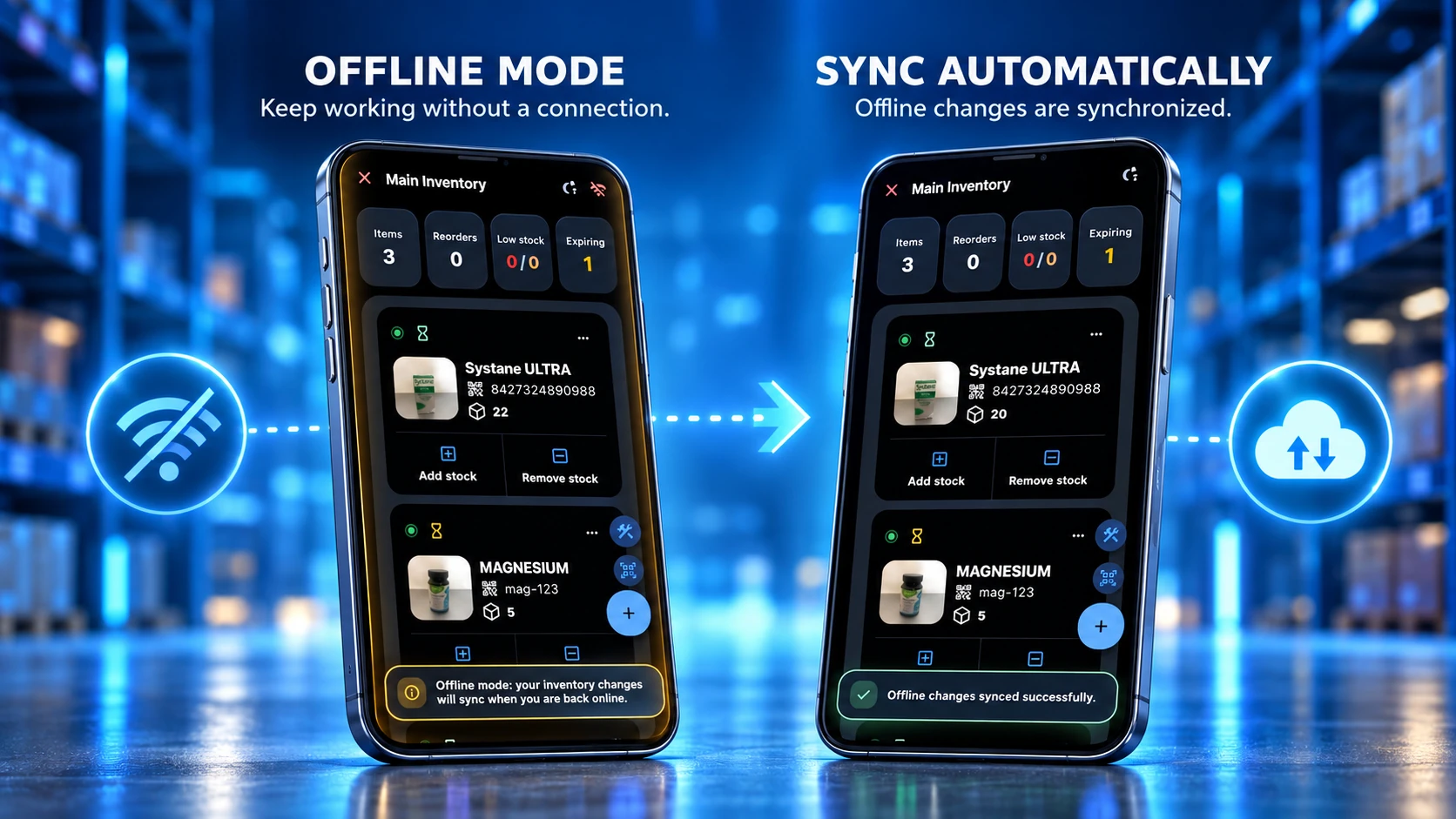
Storagemagus keeps your inventory workflow moving even when your connection does not. Teams can continue working from a supported mobile device in low-connectivity environments, remote locations, warehouses with weak signal, or while travelling between sites, then sync changes later when internet access is available again.

This gives your business more flexibility during real-world inventory tasks because scanning, reviewing items, and managing stock no longer depends on having a perfect connection at every moment. Instead of stopping work, your team can continue collecting stock updates and synchronize them later.

Scan inventory with an Android phone in low-light warehouse conditions

Scan in Low Light Without Dedicated Hardware

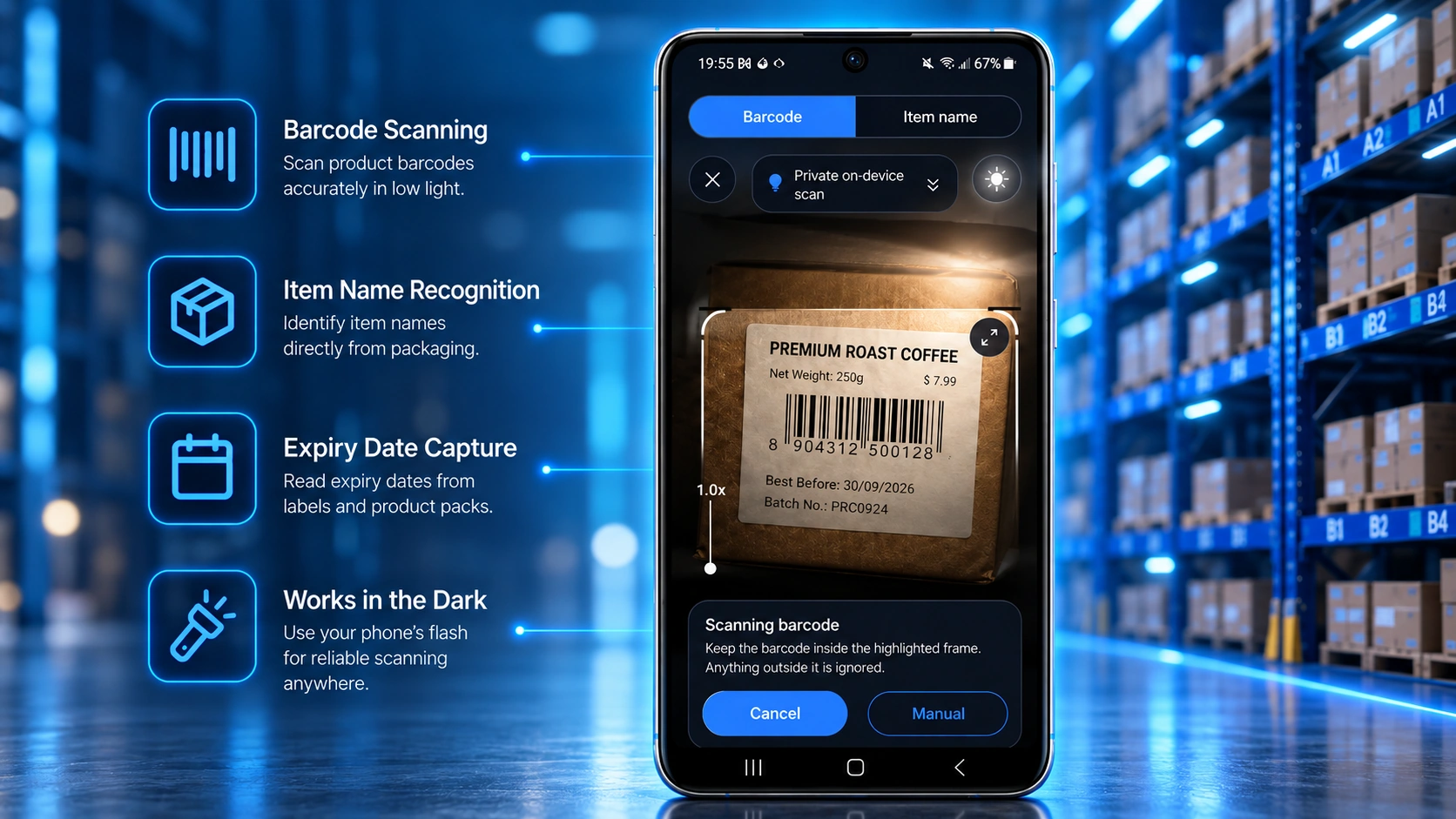
Storagemagus uses the camera and built-in flashlight on supported Android, iPhone, and iPad devices to scan product information in low-light warehouses, stockrooms, retail stores, workshops, restaurants, laboratories, and mobile work environments.

Whether you are receiving deliveries, performing stock counts, or locating products, everyday mobile scanning does not require a separate handheld scanner. You can identify the item where the work happens and continue directly to its stock record.

Manual item search in Storagemagus web app

Manual Item Search and Optional Web Scanners

Storagemagus gives you complete flexibility with both automatic barcode scanning and manual search options across Android, the iPhone and iPad TestFlight beta, and web browsers. If your phone's camera is unavailable, a barcode is damaged, or you prefer working on a desktop or laptop, you can easily search, locate, and manage items by typing them in manually. On the web app, external barcode scanners are also supported for faster workflows. Wherever you are, your inventory remains fully accessible, organized, and synchronized in real-time through real-time cloud synchronization features.

Why Barcode Scanning Improves Inventory Accuracy

Inventory mistakes usually happen during routine daily tasks rather than major warehouse events. A number entered incorrectly, a product recorded under the wrong name, or an item placed into stock without being logged can slowly create bigger reporting problems over time. Barcode scanning helps prevent those issues by giving staff a faster and more consistent way to identify items. Instead of relying on memory, handwritten notes, or manual typing, each product can be matched to a scannable code and captured in seconds with much lower risk of error.

With Storagemagus, barcode scanning becomes part of a practical inventory workflow rather than a separate technical step. Team members can scan an item when receiving stock, checking quantities, locating products, or confirming movement between shelves and rooms. This creates a more accurate inventory history because each scan ties the physical item to the digital record immediately. Better accuracy means fewer stock discrepancies, fewer avoidable reorder problems, and more confidence in the numbers you see when making purchasing or operational decisions. Businesses that want stronger controls can also pair scanning with inventory audit tools for clearer accountability.

Mobile Inventory Scanning for Small Businesses

Small businesses often need inventory tools that are simple enough to use every day but flexible enough to grow with the business. A shop owner, service team, workshop operator, or food business may not have the time to manage spreadsheets, handwritten stock lists, and separate tracking tools across multiple devices. A mobile-first barcode scanning workflow can reduce that complexity by allowing products to be added, updated, and checked where the work is actually happening.

Storagemagus is useful in these situations because it lets small teams work from a supported mobile device without needing dedicated scanning hardware for every task. Items can be scanned at the shelf, in the back room, at delivery time, or during a stock check. That makes it easier to maintain current inventory data throughout the day instead of waiting to enter everything later. For small businesses, the real benefit is not just speed. It is the ability to keep inventory records accurate while staying focused on sales, fulfillment, purchasing, and customer service. Teams comparing plans for that next stage can review Storagemagus pricing options before they create a free account.

Mobile Barcode Scanning for Warehouse Stock

In warehouse environments, inventory tracking usually depends on speed, visibility, and repeatable processes. Staff need to know what arrived, what was moved, what is reserved, and what is running low. When items are stored across different shelves, bins, or rooms, scanning helps reduce the time spent searching and checking products manually. A single scan can confirm the item identity much faster than comparing similar labels by eye, especially when many products look alike or share similar names.

Storagemagus supports this type of workflow by making item capture and lookup straightforward on mobile devices. Teams can scan products during receiving, cycle counts, internal transfers, and picking activities. Because the app is designed around inventory use rather than general note-taking, the data collected during those actions stays connected to the actual stock record. That is valuable for warehouse operations where even small inconsistencies can affect replenishment planning, order preparation, and space management. Clearer tracking also makes it easier to spot recurring issues such as misplaced stock, duplicate item records, or unexpected usage patterns. For planning ahead, warehouses can combine scanning activity with stock prediction features to understand future demand more clearly.

Benefits of Mobile Inventory Scanning

Reduce Stock Errors

Capture product data faster and more consistently so your team can avoid preventable stock mistakes and keep records more reliable.

Save Time

Speed up receiving, stock checks, item lookup, and routine inventory updates without relying on slow manual entry workflows.

Review Stock and Expiry Alerts

Use supporting alerts to identify low stock and expiring products after item information has been captured.

Work Offline

Keep inventory tasks moving in low-connectivity environments and sync updates later when internet access is available again.

Collaborate with Teams

Give multiple team members access to shared inventory workflows so updates, reviews, and daily actions stay aligned.

Improve Inventory Accuracy

Build cleaner stock data over time with more dependable scanning, item matching, and inventory tracking across daily operations.

These benefits help warehouses, retail stores, workshops, laboratories, restaurants, and small businesses stay more organized while reducing wasted time and avoidable stock issues. By combining mobile scanning, expiry awareness, offline access, and team collaboration, Storagemagus supports faster inventory workflows and better day-to-day decision-making across different work environments.

Supporting Inventory Features

Prefer a simpler daily workflow? See how the intuitive inventory interface helps teams navigate stock tasks with less training.

Mobile Inventory

Manage stock updates from supported Android, iPhone, and iPad devices with mobile-first inventory workflows built for speed and flexibility.

Explore Mobile Inventory

Cloud Sync

Keep inventory records updated across supported mobile devices and web browsers with real-time synchronization.

View Cloud Sync

Team Collaboration

Invite team members, share responsibilities, and keep everyone aligned around the same live inventory data.

Discover Collaboration

Inventory Audit

Compare counted stock with recorded inventory to spot discrepancies earlier and improve record reliability.

Open Inventory Audit

Stock Prediction

Use historical inventory behavior to understand demand patterns and make smarter replenishment decisions.

See Stock Prediction

Frequently Asked Questions

Yes. Storagemagus turns a supported Android phone into a mobile inventory scanner for identifying items, adding products, updating stock, and locating inventory.

Storagemagus supports barcodes and QR codes and can also recognize item names and expiry dates from product packaging on supported devices.

Yes. After identifying an item, users can add it to inventory, adjust its quantity, and keep the corresponding stock record current from the mobile workflow.

No dedicated scanner is required for everyday mobile scanning because Storagemagus uses the camera on a supported mobile device. External barcode scanners can also be used with the web app when preferred.

Storagemagus supports offline inventory workflows on Android and through the iPhone and iPad TestFlight beta, so warehouse and field work can continue during temporary connectivity gaps and synchronize later.

Download Storagemagus Now or register in your browser!

Use Storagemagus publicly on Android or through the web, with iPhone and iPad access currently available through Apple TestFlight beta.

Download Storagemagus on Google Play

Storagemagus for iPhone & iPad — Join the Beta

The iPhone and iPad app is available through Apple TestFlight beta and has not yet been publicly released on the App Store.

Join the iPhone & iPad Beta
Inventory Audit and Stock Prediction feature pages are coming soon.